
Need Agricultural Diagnostic Solutions?
Find the right CATSCAN diagnostic solution, adapters, and compatibility for the equipment you service. Your complete source for agricultural diagnostic tools, adapters, and equipment compatibility.
Find the CATSCAN diagnostic coverage, equipment connections, adapters, training, and buying information you need.
Built for Agricultural Equipment
CATSCAN Tool brings professional diagnostic capability to the agricultural equipment technicians, service operations, and repair facilities responsible for keeping machinery working.
Tractors & Power Units
Diagnose supported tractors and diesel-powered agricultural equipment across multiple manufacturers from one professional diagnostic platform.
Harvesting Equipment
Access diagnostic information for supported combines, harvesters, and electronically controlled equipment used throughout modern agricultural operations.
Specialty & Support Equipment
Extend diagnostic capability to supported sprayers and other specialized agricultural machinery used in the field, service shop, and fleet.
Explore supported agricultural OEMs and find the right CATSCAN diagnostic setup for the equipment you service.
Agricultural OEM Coverage
Service equipment across multiple manufacturers from one professional diagnostic platform. CATSCAN brings supported agricultural OEM diagnostics together to help technicians work across mixed equipment fleets.
Don't See Your Equipment?
Tell us the manufacturer, model, and year. We'll help determine the CATSCAN diagnostic coverage and connection options available for your equipment.
More Than Reading Codes
CATSCAN gives technicians access to professional diagnostic functions designed to help identify faults, evaluate system operation, and perform supported service procedures across agricultural equipment.
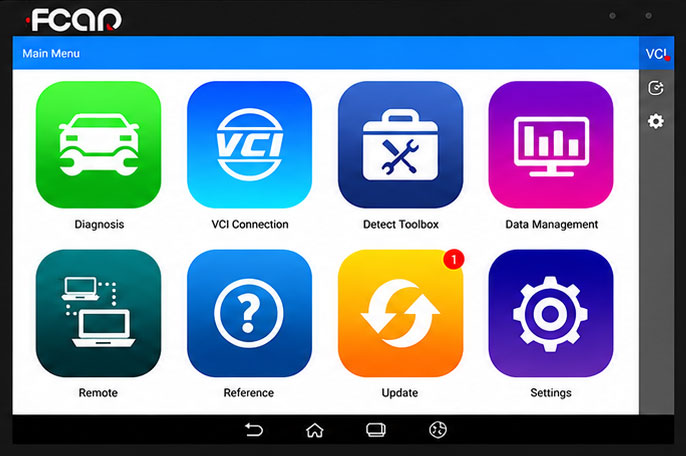
Go Beyond the
Check Engine Light.
Modern agricultural equipment depends on electronically controlled systems throughout the machine. CATSCAN provides technicians with deeper diagnostic access to supported systems so they can move from identifying a fault to understanding what the equipment is actually doing.
Fault Code Diagnostics
Read and clear supported diagnostic trouble codes to help identify faults across electronically controlled systems.
Live Data
View supported real-time system information and operating values while diagnosing equipment performance.
Active & Bidirectional Tests
Command supported components and systems during diagnosis to help verify operation and isolate problems.
Calibrations & Service Functions
Perform supported resets, calibrations, adaptations, and service procedures required during equipment maintenance and repair.
System-Level Troubleshooting
Work deeper into supported electronic systems instead of relying on basic generic code information alone.
Available diagnostic functions vary by manufacturer, model, year, controller, and system.
Meet the CATSCAN Plus Diagnostic Tool
One professional diagnostic platform built to help technicians service supported agricultural equipment across multiple manufacturers, systems, and applications.
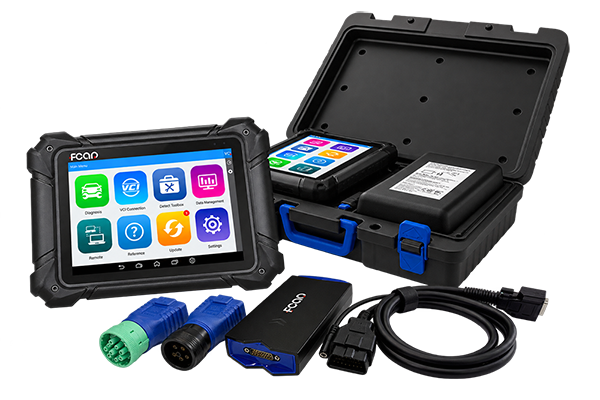
CATSCAN Plus
Diagnostic Tool
The CATSCAN Plus Diagnostic Tool utilizes the FCAR F7SN diagnostic platform to provide professional diagnostic access for supported agricultural, off-highway, material handling, and heavy-duty equipment.
The diagnostic platform is only part of the system. Manufacturer and equipment-specific connections may require the appropriate diagnostic adapter.
Build Your CATSCAN Setup
Start with the CATSCAN Plus diagnostic platform, then add the connections required for the manufacturers and equipment your operation actually services.
Choose the Platform
Start with the CATSCAN Plus Diagnostic Tool, utilizing the professional FCAR F7SN diagnostic platform for supported agricultural and commercial equipment.
Add Your Connections
Match additional diagnostic adapters to the manufacturers, equipment, and connection standards your technicians encounter.
Put It to Work
Use CATSCAN coverage, diagnostic capabilities, and educational resources to build a system around the equipment you service.
CATSCAN Plus
Diagnostic Tool
A professional multi-system diagnostic solution designed for technicians working across supported agricultural, off-highway, material handling, and heavy-duty equipment.
Make Sure Your Setup Matches Your Equipment.
You've already seen the equipment types, OEM coverage, diagnostic capabilities, and connection system. Before ordering, confirm the details that determine the right CATSCAN configuration.
Know Before You Buy
Get answers to common questions about CATSCAN agricultural equipment coverage, diagnostic capabilities, connections, software updates, and ownership before choosing your setup.
Does CATSCAN work with all agricultural equipment?
CATSCAN provides diagnostic coverage for supported agricultural equipment across multiple manufacturers, but coverage is not universal.
Availability can vary by manufacturer, model, year, controller, system, and diagnostic function. Review the OEM coverage on this page and verify specific equipment when necessary.
What diagnostic functions can I perform?
Depending on the supported equipment and system, available functions may include fault-code diagnostics, live data, active or bidirectional testing, system-level diagnostics, calibrations, resets, adaptations, and supported service procedures.
Specific functions vary by equipment application.
Do I need additional adapters for agricultural equipment?
It depends on the equipment being serviced. The standard CATSCAN F7SN kit includes the main diagnostic cable, 6-pin diesel adapter, and 9-pin diesel adapter.
Other manufacturer or equipment-specific connections may require an additional adapter purchased separately.
What comes with the CATSCAN Plus Diagnostic Tool?
The supplied kit information includes the main tablet, VCI box, DB15-to-OBD16 main cable, 6-pin diesel adapter, 9-pin diesel adapter, AC adapter and charger, battery power clip, and hardshell case.
The package also includes two years of software updates and a one-year manufacturer hardware warranty.
Does the CATSCAN software require an internet connection?
The FCAR F7SN platform uses preloaded diagnostic software, allowing diagnostic work to be performed without requiring a continuous internet connection.
Internet access may still be needed for software-related services such as downloading available updates.
Does the CATSCAN diagnostic license expire?
The diagnostic software license does not expire based on the product information supplied for the FCAR F7SN platform.
Two years of software updates are included. Continued database updates after the included update period may be available separately.
Can CATSCAN diagnose more than agricultural equipment?
Yes. The CATSCAN Plus / FCAR F7SN platform is positioned for supported agricultural equipment, off-highway equipment, material handling applications, and heavy-duty vehicles.
Coverage varies by application, so use the appropriate CATSCAN application page to review the equipment category you service.
How do I know which CATSCAN adapters I need?
Start with the manufacturer, equipment model, year, and diagnostic connector. The required connection depends on the equipment and system being diagnosed.
Additional adapters can then be selected around the equipment your operation actually services instead of purchasing every available connector.
Where can I learn how to use CATSCAN?
CATSCAN University is being developed as the central resource for tutorials, product information, diagnostic guidance, adapter information, software updates, and how-to content.
The CATSCAN video library will provide additional demonstrations and walkthroughs as new training material becomes available.
Check your manufacturer, model, year, and equipment configuration before ordering your CATSCAN setup.
Built Around
the Work.
CATSCAN Tool is focused on the diagnostic needs of technicians working with agricultural, off-highway, material handling, and heavy-duty equipment. The goal is simple: bring the tool, coverage, connections, and knowledge together so technicians can make a more informed diagnostic decision.
Don't Just Buy a Scanner.
Build a Diagnostic System Around
the Equipment You Service.
Equipment Focused
Start with the vocation, manufacturers, and equipment your operation actually works on.
Multi-OEM Diagnostics
Bring supported diagnostic coverage across multiple manufacturers into one professional platform.
Expandable Connections
Add diagnostic adapters around the equipment and connection standards your technicians encounter.
Knowledge Included
Use CATSCAN University, tutorials, videos, and technical resources to get more from the diagnostic platform.
CATSCAN identifies the manufacturer behind the diagnostic technology. The CATSCAN Plus Diagnostic Tool utilizes the FCAR F7SN platform while CATSCAN brings the equipment applications, connection options, product resources, and buying experience together around the technicians we serve.